Graph-Based Linkage Representation
This tutorial covers pylinkage’s graph-based representations for linkages:
Hypergraph module: the topology of a mechanism — joints, links and rigid bodies — with the geometry kept in a separate
DimensionsobjectAssur module: formal kinematic decomposition of that topology into a driver and zero-DOF Assur groups
Topology module: mobility, isomorphism and a catalog of known topologies
These representations are useful for:
Structural analysis of linkage topology
Building complex mechanisms from reusable sub-assemblies
Automated linkage generation and transformation
Research in mechanism theory
The examples build one four-bar and hand it from module to module, so run them in order.
Hypergraph Representation
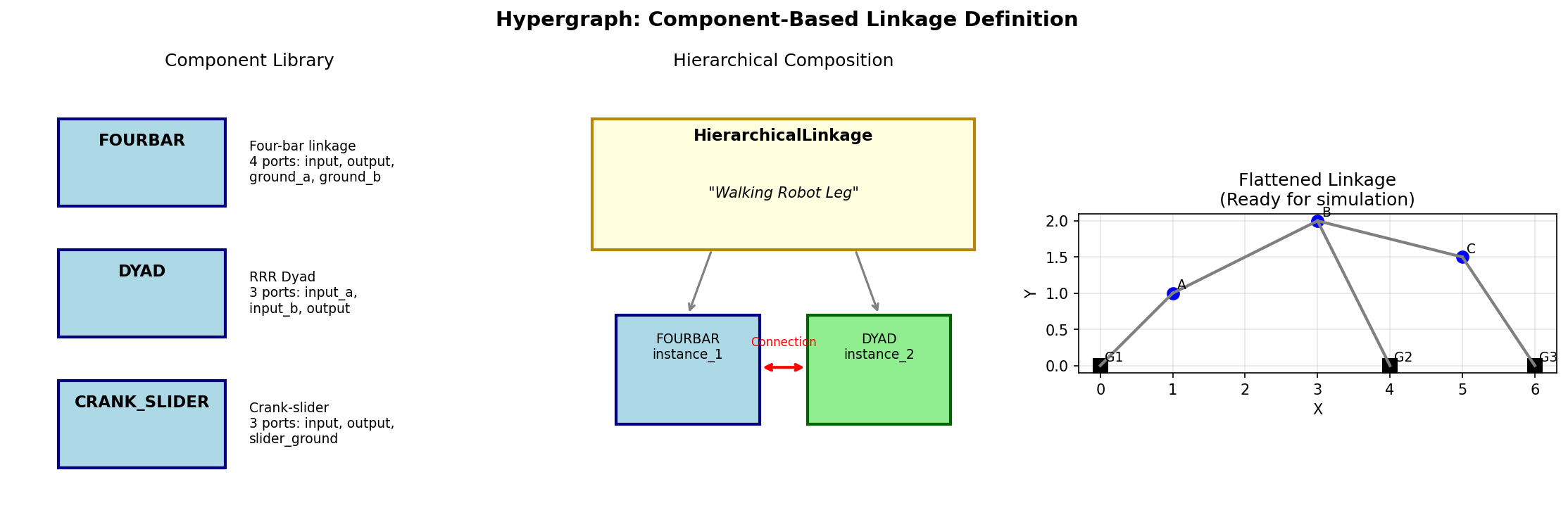
Component-based linkage design: a library of reusable components (left), hierarchical composition (middle), and the flattened result (right).
Overview
A HypergraphLinkage is pure topology:
Node: a joint, with a
role(GROUND,DRIVERorDRIVEN) and ajoint_type(REVOLUTEorPRISMATIC). No position.Edge: a binary link between two joints. No length.
Hyperedge: an N-way rigid body — a ternary link, a chassis.
Geometry — joint positions, link lengths, driver speeds — lives in a
Dimensions object, so one topology can be paired with many geometries.
Creating a Hypergraph Linkage
from pylinkage.hypergraph import Edge, HypergraphLinkage, Node, NodeRole

# A four-bar: two grounded joints, one motor-driven crank pin, one
# passive coupler-rocker pin
hg = HypergraphLinkage(name="FourBar")
hg.add_node(Node("A", role=NodeRole.GROUND))
hg.add_node(Node("B", role=NodeRole.DRIVER))
hg.add_node(Node("C", role=NodeRole.DRIVEN))
hg.add_node(Node("D", role=NodeRole.GROUND))

# Three binary links: crank A-B, coupler B-C, rocker C-D. The ground
# link between A and D is implied by their role.
hg.add_edge(Edge("AB", "A", "B"))
hg.add_edge(Edge("BC", "B", "C"))
hg.add_edge(Edge("CD", "C", "D"))

print(f"Nodes: {list(hg.nodes)}")
print(f"Edges: {[(e.id, e.source, e.target) for e in hg.edges.values()]}")
print(f"Grounds: {[n.id for n in hg.ground_nodes()]}")
print(f"Drivers: {[n.id for n in hg.driver_nodes()]}")
Expected output:
Nodes: ['A', 'B', 'C', 'D']
Edges: [('AB', 'A', 'B'), ('BC', 'B', 'C'), ('CD', 'C', 'D')]
Grounds: ['A', 'D']
Drivers: ['B']
Attaching Dimensions
Dimensions names the same nodes and edges: an assembly position for
every joint, a length for every edge, and an angular velocity (radians
per step) for every driver. Positions are only the starting configuration;
they also pick the assembly branch, so place C on the side you want.
import math
from pylinkage.dimensions import Dimensions, DriverAngle

CRANK, COUPLER, ROCKER, GROUND = 1.0, 3.0, 3.0, 4.0
OMEGA = math.tau / 60  # one full turn in 60 steps

# Crank along +x at phase 0; C on the upper branch, where the coupler
# and rocker circles intersect
bx, by = CRANK, 0.0
dx, dy = GROUND, 0.0
half = math.hypot(dx - bx, dy - by) / 2
cx, cy = (bx + dx) / 2, math.sqrt(COUPLER**2 - half**2)

dims = Dimensions(
    node_positions={"A": (0, 0), "B": (bx, by), "C": (cx, cy), "D": (dx, dy)},
    driver_angles={"B": DriverAngle(angular_velocity=OMEGA)},
    edge_distances={"AB": CRANK, "BC": COUPLER, "CD": ROCKER},
)

# Consistency check without raising: an empty list means valid
print(dims.validate_against(hg.nodes.keys(), hg.edges.keys()))
Converting to a Mechanism
from pylinkage.hypergraph import to_mechanism

mechanism = to_mechanism(hg, dims)
loci = list(mechanism.step())

print(f"Mechanism joints: {[j.id for j in mechanism.joints]}")
print(f"Simulation steps: {len(loci)}")

# The Mechanism draws and animates like a Linkage
import pylinkage as pl
pl.show_linkage(mechanism)
Expected output:
Mechanism joints: ['A', 'D', 'B', 'C']
Simulation steps: 60
Ternary Links via Hyperedge
A coupler point P rigidly attached to the coupler makes B-C-P one
rigid triangle. A Hyperedge records that the three joints share one
body: to_mechanism holds every pair of its nodes at the distance
their initial positions give, and mobility analysis counts it as one
link. Edges inside the hyperedge are optional — here they carry the
side lengths so that Dimensions fully describes the triangle.
from pylinkage.hypergraph import Hyperedge

hg_coupler = HypergraphLinkage(name="CouplerFourBar")
for node_id, role in [
    ("A", NodeRole.GROUND), ("B", NodeRole.DRIVER), ("C", NodeRole.DRIVEN),
    ("P", NodeRole.DRIVEN), ("D", NodeRole.GROUND),
]:
    hg_coupler.add_node(Node(node_id, role=role))

hg_coupler.add_edge(Edge("AB", "A", "B"))
hg_coupler.add_edge(Edge("CD", "C", "D"))
# All three sides of the coupler triangle: this is what makes it rigid
hg_coupler.add_edge(Edge("BC", "B", "C"))
hg_coupler.add_edge(Edge("BP", "B", "P"))
hg_coupler.add_edge(Edge("CP", "C", "P"))
# The hyperedge labels the triangle as one body for topology analysis
hg_coupler.add_hyperedge(Hyperedge("coupler", ("B", "C", "P"), name="coupler triangle"))

# P sits one unit above the middle of B-C
ux, uy = (cx - bx) / COUPLER, (cy - by) / COUPLER
px, py = bx + 0.5 * (cx - bx) - uy, by + 0.5 * (cy - by) + ux

dims_coupler = Dimensions(
    node_positions={"A": (0, 0), "B": (bx, by), "C": (cx, cy), "P": (px, py), "D": (dx, dy)},
    driver_angles={"B": DriverAngle(angular_velocity=OMEGA)},
    edge_distances={
        "AB": CRANK, "CD": ROCKER, "BC": COUPLER,
        "BP": math.hypot(px - bx, py - by),
        "CP": math.hypot(px - cx, py - cy),
    },
)

coupler_mechanism = to_mechanism(hg_coupler, dims_coupler)
coupler_path = [step[-1] for step in coupler_mechanism.step()]
print(f"P traces {len(coupler_path)} points")
Building Hierarchical Linkages
ComponentInstance wraps a hypergraph with named ports — internal
nodes promoted for external connection. A HierarchicalLinkage holds
instances plus Connection objects that fuse one instance’s port with
another’s; flatten() returns a single hypergraph.
from pylinkage.hypergraph import ComponentInstance, Connection, HierarchicalLinkage

# A reusable leg: motor M, knee K, foot F, hip H
leg = HypergraphLinkage(name="leg")
leg.add_node(Node("M", role=NodeRole.GROUND))
leg.add_node(Node("K", role=NodeRole.DRIVER))
leg.add_node(Node("F", role=NodeRole.DRIVEN))
leg.add_node(Node("H", role=NodeRole.GROUND))
leg.add_edge(Edge("MK", "M", "K"))
leg.add_edge(Edge("KF", "K", "F"))
leg.add_edge(Edge("FH", "F", "H"))

# Two legs sharing their hip pivot
left = ComponentInstance(id="left", topology=leg, ports={"hip": "H"})
right = ComponentInstance(id="right", topology=leg, ports={"hip": "H"})

chassis = HierarchicalLinkage(
    instances={"left": left, "right": right},
    connections=[Connection("left", "hip", "right", "hip")],
    name="two-leg chassis",
)

flat = chassis.flatten()
print(f"Flattened: {len(flat.nodes)} nodes, {len(flat.edges)} edges")
for edge in flat.edges.values():
    print(f"  {edge.id}: {edge.source} -> {edge.target}")
Expected output:
Flattened: 7 nodes, 6 edges
  left.MK: left.M -> left.K
  left.KF: left.K -> left.F
  left.FH: left.F -> left.H
  right.MK: right.M -> right.K
  right.KF: right.K -> right.F
  right.FH: right.F -> left.H
Both hips became the single node left.H (the from side of the
connection is canonical). Instance ids prefix every node and edge, so a
flattened graph takes Dimensions keyed the same way.
Assur Group Theory
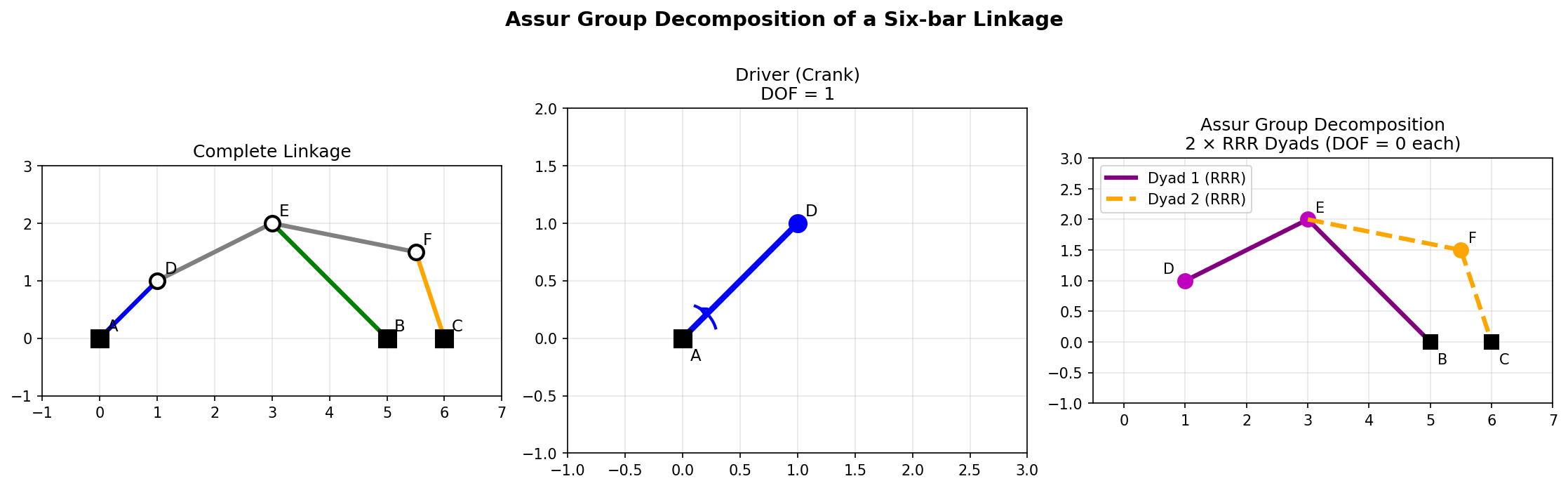
Decomposition of a six-bar linkage into a driver (crank) and two RRR dyads. Each Assur group has zero degrees of freedom and can be solved independently.
Overview
Assur groups are the fundamental building blocks of planar linkages. Any planar linkage can be decomposed into:
A driver (typically a crank)
One or more Assur groups (zero-DOF kinematic chains)
The groups pylinkage recognises are dyads — two links, three joints — named
by their joint types (RRR, RRP, RPR, PRR, PP) — and the
six-joint triad. The same classification drives the numeric solver: each
group class maps to one solver kernel (circle_circle for an RRR dyad).
Decomposing a Linkage
The Assur module works on a LinkageGraph; from_hypergraph converts
the topology built above.
from pylinkage.assur import decompose_assur_groups, from_hypergraph

graph = from_hypergraph(hg)
result = decompose_assur_groups(graph)

print(f"Ground joints: {result.ground}")
print(f"Drivers:       {result.drivers}")
print(f"Assur groups:  {len(result.groups)}")
for group in result.groups:
    print(f"  {type(group).__name__} {group.joint_signature}: "
          f"solves {group.internal_nodes} from {group.anchor_nodes} "
          f"through links {group.internal_edges}")
Expected output:
Ground joints: ['A', 'D']
Drivers:       ['B']
Assur groups:  1
  Dyad RRR: solves ('C',) from ('B', 'D') through links ('BC', 'CD')
validate_decomposition returns a list of problems — an empty list
means every joint is either ground, driven by a motor, or solved by a
group:
from pylinkage.assur import validate_decomposition

print(f"Problems: {validate_decomposition(result)}")
Converting Graph to Mechanism
A LinkageGraph plus Dimensions gives a Mechanism too, and the
conversion runs both ways:
from pylinkage.assur import graph_to_mechanism, mechanism_to_graph

mechanism = graph_to_mechanism(graph, dims)
print(f"Created mechanism with {len(mechanism.joints)} joints")
for joint in mechanism.joints:
    print(f"  {joint.id}: {type(joint).__name__}")

# Back from any Mechanism, e.g. one from MechanismBuilder or synthesis
graph_back, dims_back = mechanism_to_graph(mechanism)
print(f"Recovered {len(graph_back.nodes)} nodes, lengths {dims_back.edge_distances}")
Expected output:
Created mechanism with 4 joints
  A: GroundJoint
  D: GroundJoint
  B: RevoluteJoint
  C: RevoluteJoint
Recovered 4 nodes, lengths {'edge_0': 4.0, 'edge_1': 1.0, 'edge_2': 3.0, 'edge_3': 3.0}
The recovered graph names its edges edge_0 … and includes the ground
link explicitly; the topology is the same, the labels are not.
AssurMechanism
AssurMechanism bundles a Mechanism with its decomposition:
from pylinkage.assur import AssurMechanism
from pylinkage.mechanism import fourbar

assur = AssurMechanism.from_mechanism(fourbar(crank=1.0, coupler=3.0, rocker=3.0, ground=4.0))

print(f"DOF: {assur.degree_of_freedom}")
print(f"Assur groups: {assur.num_assur_groups}")
print(f"Valid: {assur.is_valid()}")
print(f"Group signatures: {[g.joint_signature for g in assur.assur_groups]}")
Expected output:
DOF: 1
Assur groups: 1
Valid: True
Group signatures: ['RRR']
Assur Signatures
A signature string names a group by its joint types. parse_signature
classifies it, and signature_to_hypergraph produces the group’s
topology — anchors plus internal joints — ready to be composed into a
larger mechanism:
from pylinkage.assur import parse_signature, signature_to_hypergraph

signature = parse_signature("RRP")
print(f"{signature.raw_string}: {signature.group_class.name}, joints {[j.name for j in signature.joints]}")

dyad = signature_to_hypergraph("RRR", prefix="d1_")
print(f"Nodes: {list(dyad.nodes)}")
print(f"Edges: {list(dyad.edges)}")
Expected output:
RRP: DYAD, joints ['REVOLUTE', 'REVOLUTE', 'PRISMATIC']
Nodes: ['d1_anchor_0', 'd1_anchor_1', 'd1_internal_0']
Edges: ['d1_link_0', 'd1_link_1']
Serializing Linkage Graphs
Both graph flavours are plain data. graph_to_dict gives a JSON-ready
dictionary; graph_to_json writes a file.
import json
import tempfile
from pathlib import Path

from pylinkage.assur import graph_from_json, graph_to_dict, graph_to_json

print(json.dumps(graph_to_dict(graph)["nodes"][0]))

with tempfile.TemporaryDirectory() as tmp:
    path = Path(tmp) / "fourbar_assur.json"
    graph_to_json(graph, path)
    loaded = graph_from_json(path)
print(f"Reloaded {len(loaded.nodes)} nodes, {len(loaded.edges)} edges")
The hypergraph module has the same four functions for HypergraphLinkage
(pylinkage.hypergraph.graph_to_json …) plus hierarchical_to_json /
hierarchical_from_json for a HierarchicalLinkage.
Analysis Applications
Mobility Analysis
compute_mobility applies the Kutzbach–Grübler equation
\(M = 3(n - 1) - 2 j_1 - j_2\) to a hypergraph. Links are rigid
bodies: the ground, one per edge and one per hyperedge — except that
bodies pinned together at two or more nodes are one body, so a hyperedge
over a triangle of edges is a single link. A node shared by \(k\)
bodies is \(k - 1\) one-DOF joints: a coupler point that belongs to
one body only is not a joint, and a pin where three links meet is two.
from pylinkage.topology import compute_dof, compute_mobility

info = compute_mobility(hg)
print(f"Links: {info.num_links}, full joints: {info.num_full_joints}, DOF: {info.dof}")

mobility = compute_dof(hg)
if mobility == 1:
    print("Single-DOF mechanism (typical linkage)")
elif mobility == 0:
    print("Structure (no motion)")
else:
    print(f"Under-constrained ({mobility} DOF)")
Expected output:
Links: 4, full joints: 4, DOF: 1
Single-DOF mechanism (typical linkage)
The coupler four-bar above, with its hyperedge and the three edges inside it, is therefore still four links and one degree of freedom:
info = compute_mobility(hg_coupler)
print(f"Coupler four-bar: {info.num_links} links, DOF {info.dof}")
Expected output:
Coupler four-bar: 4 links, DOF 1
Three edges closing a triangle without a hyperedge are counted as three bars pinned together; the degree of freedom comes out the same, only the link count differs. The topology catalog below writes every ternary link as a hyperedge with no edges among its nodes.
Isomorphism Detection
Two linkages have the same topology when their graphs are isomorphic, whatever the node names or the dimensions:
from pylinkage.topology import are_isomorphic, canonical_hash

other = HypergraphLinkage(name="renamed")
for node_id, role in [
    ("p", NodeRole.GROUND), ("q", NodeRole.DRIVER), ("r", NodeRole.DRIVEN), ("s", NodeRole.GROUND),
]:
    other.add_node(Node(node_id, role=role))
other.add_edge(Edge("e1", "p", "q"))
other.add_edge(Edge("e2", "q", "r"))
other.add_edge(Edge("e3", "r", "s"))

print(f"Same topology: {are_isomorphic(hg, other)}")
print(f"Same hash: {canonical_hash(hg) == canonical_hash(other)}")
print(f"Coupler four-bar is a four-bar: {are_isomorphic(hg, hg_coupler)}")
Expected output:
Same topology: True
Same hash: True
Coupler four-bar is a four-bar: False
The Topology Catalog
Known one-DOF topologies up to eight links ship as a catalog, each with its Assur decomposition and a ready-made hypergraph:
from pylinkage.topology import load_catalog

catalog = load_catalog()
for entry in catalog.by_num_links(6):
    print(f"{entry.id}: {entry.name}, {entry.num_joints} joints, groups {entry.assur_groups}")

stephenson = catalog.get("stephenson").to_graph()
print(f"Stephenson: {len(stephenson.nodes)} nodes, {len(stephenson.hyperedges)} ternary links")
Expected output:
watt: Watt six-bar, 7 joints, groups ('RRR', 'RRR')
stephenson: Stephenson six-bar, 7 joints, groups ('RRRRRR',)
Stephenson: 7 nodes, 2 ternary links
pylinkage.synthesis.multi_topology_synthesize searches this catalog for
mechanisms whose coupler passes through given points; see Linkage Synthesis.
When to Use Graph Representations
Use the Hypergraph module when:
You’re building complex mechanisms from parts
You need a topology without geometry to reason about — enumeration, isomorphism, mobility
You want to pair one topology with many dimension sets
Use the Assur module when:
You need formal kinematic analysis
You want to understand the structure of a linkage
You’re implementing new solving algorithms
Use the component API (``Linkage``) or ``MechanismBuilder`` when:
You just need simulation and visualization
You’re doing optimization
You have a simple mechanism
Next Steps
Getting Started - Basic linkage simulation
Linkage Synthesis - Design linkages from requirements
See
pylinkage.hypergraphfor the hypergraph APISee
pylinkage.assurfor the Assur group APISee
pylinkage.topologyfor mobility, isomorphism and the catalog